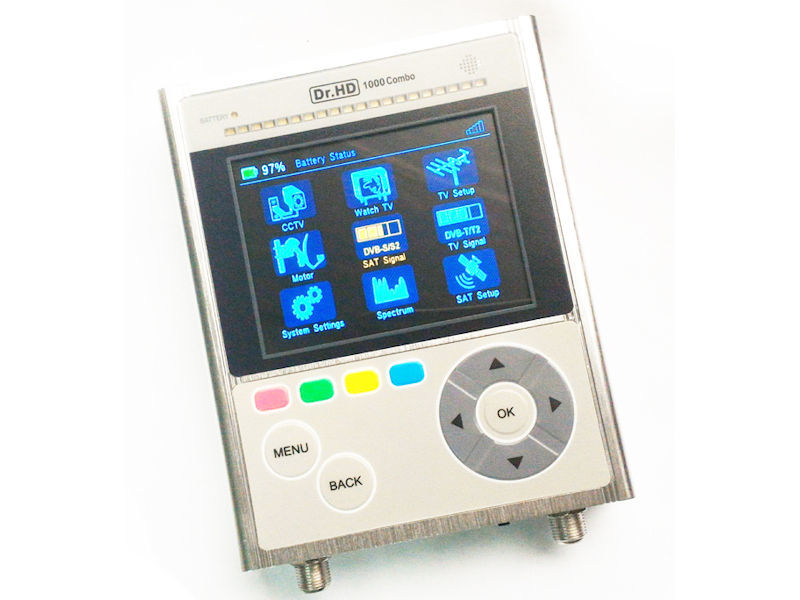
Dr HD COMBO Colour Spectrum Signal Meter
SKU: DRHD1000CMB
Trade price hidden
Prices are reserved for approved trade accounts. Register and we'll unlock the full catalogue pricing.
Product DescriptionCOMPACT SATELLITE/TERRESTRIAL METER WITH SPECTRUM & LIVE TV COLOUR SCREENDR HD 1000 COMBO COLOUR SCREEN SATELLITE/TERRESTRIAL/CABLE METER WIT
Description & specs
Product DescriptionCOMPACT SATELLITE/TERRESTRIAL METER WITH SPECTRUM & LIVE TV COLOUR SCREENDR HD 1000 COMBO COLOUR SCREEN SATELLITE/TERRESTRIAL/CABLE METER WITH NIT / SPECTRUM ANALYSERUPDATED VERSIONNEW 'COMBO' VERSION WITH ADDED TERRESTRIAL T/T2 FUNCTION & PANASONIC RECHARGEABLE BATTERYWith the DR HD1000 COMBO searching of satellite and terrestrial signals is now easy, fast and effective. As well as having many technical features the HD1000 COMBO will auto-detect the satellite and includes a LIVE TV function with both audio and video plus a CCTV function providing audio+video from the camera and 12V power.Key features:Compact, easy-to-use satellite/terrestrial/cable meter for easy, fast and precise antennae installationFast Real-time Spectrum ≥ 9FPS (≤110ms)Fast SAT ID function, you instantly know which satellite the signal is coming fromWatching of TV channelsRed/Green LED bars for additional convenience in bright sunlightDisplays SAT signal level + TP level in spectrum modeConstellation function (fast-tune)POP: Proof of Performance logs (exportable to USB)DVB-S/S2, DVB-T/T2 & DVB-C supportRich display of: BER, MER, PER, SNR, Link Margin, C/N, Constellation and RF levelCross-polarization (X-pol) function for installation of professional LNB'sFast SAT ID function, so you always know from what SAT the signal is coming fromNo need for satellite to be in database for SAT ID function to workVoltage and Current display of LNB and/or Terrestrial antennaAudio (beeper) and visual alarm when signal lockedKeyboard glows in the dark, RCU includedWi-Fi connectivity (with optional USB dongle)Light-weight, strong and robust aluminum bodyStay hands-free: can be attached to your wrist/hand or belt or neck-strapCustom carry case for installations in direct sunlight + additional protectionUSB port for more functions (software update and export of POP logs)CCTV function (displays RCA audio+video from Cam, and provides power 12V)Auto search, fast blind search, NIT searchSatellite position/Network name/Transponder info display (by NIT)45 ... 2350 MHz input frequencyDISEqC 1.0/1.1/1.2/USALS/Unicable I/II/SCR/dCSS/JESS (EN50494/EN50607) supportCan power up USALS motor to move dishSignal Strength and Quality Digital Meter (both numerical value and picture)Field-editing is also possible (no PC needed)Easy update of SAT + TERR TP data with with Satellite.xml and Terrestrial.xmlLi-Ion battery: 3400 mAh (Panasonic)Possible to charge and power up from any DC power 10 ... 15V, even from satellite receiverCan operate without batteryHDMI outRemote Control includedRS232 for service functionsFull set of protections against short-circuit, over-current, low-grade cables, etc12 month warrantyPhysical Characteristics:Gross weight (gift box) 1.2kgNet weight (meter) 500gDimensions (meter) W: 105mm H: 30mm D: 135mmWhat's in the box?Dr HD COMBO Satellite/Terrestrial MeterRobust Nylon Carry Case240V AC Charger12V Car Cigarette Charger / Power LeadRemote ControlA/V In Cable12V Out CableFAQ:1. How to create a satlist in xml format?A. By using APK with android smart phone:http://drhd1000s.legion.name/soft/DrHD_SatFinder_014.02.apkHere you can download the latest apk for android phone.Install and open the apk.From root menu you will see "load satlist from web"You need to input longitude and latitude, google shows London should be around N51°3', W 0°07'So try to input your location info as 51N, 0W.You will see the long list, confirm and select from this list, then output to a xml file.The file will be saved in android download folder. it's a *.xml file.B. By PC:If you use pc, it's easy to get the list from:www.satellites-xml.orgIt can create a *.xml file after selection.The Dr.HD1000S can support 63 satlist max.If list is too long, you can edit the xml in PC easily. even by opening the file with windows notepad.2. How to update xml into your Meter:Copy the xml file into USB drive, plug in your Dr.HD MeterPower on and go to receiver modeSelect settings, go to sw updateYou can select and update the xml file.3. About new function: SatIDDr HD 1000S can identify the sat network name when installing the dish.Power on meter, select satfinder mode.Go to spectrum mode,Press blue key(SatID) it will auto show you current sat network name info.4. Manually move and search TPIn spectrum mode you press ok and move cursor down and down to the spectrum picture, you will see a vertical red line, then you can move this red line by pressing left or right key, to search not only the pre-setting TP, but search also any TP manually.If you find the signal peak, press OK key, if it is standard DVB-S2 signal it will show the Sat network name info.It could be very useful for finding a new satellite.